
RDS - brief outage Tues 28th 8pm
We will be renewing the SSL certificates for our RDS remoteapps to maintain secure connections.
The certificates will be renewed starting at 8.00pm on Tuesday 28th July.
During this time, there may be brief interruptions in connectivity for around 5-10 minutes after which time you can reconnect again.
If you are a regular user of remoteweb.op.ac.nz (i.e. the fully browser-based portal) it is likely you will need to clear your browser cache following the change, otherwise you may get a message "Your session ended because an unexpected server authentication certificate was received from the remote PC. Ask your admin or tech" when trying to launch a remoteapp. You may not see this dialogue either, and may experience repeated MFA prompts without it actually opening your remoteapp.
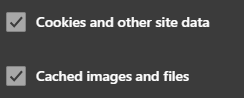
Clearing your browser cache can be acheived in Chrome or Edge by hitting "Ctrl + Shift + Delete" and selecting "All time" (for the time range) and the following options:
If you have any issues please reach out to our friendly Service Desk team (0800 765 948) and they can assist you.
Image Credit: Designed by pch.vector / Freepik
Published on 23 Jul 2026
Orderdate: 23 Jul 2026
Expiry: 30 Jul 2026
related
Lost Bangle
Small but precious to its owner This bangle, with floral and name engraving, was lost at the hockey turf on Sunday 19th July. It is of extreme sentimental value...
How to use Kāpehu - your student intranet
We know a new website can be a bit daunting sometimes, especially when you’re busy with other stuff.Hopefully this quick overview below will help you find you...
RDS - brief outage Tues 28th 8pm
We will be renewing the SSL certificates for our RDS remoteapps to maintain secure connections. The certificates will be renewed starting at 8.00pm on Tuesday...